Operating Systems Cheat Sheet — 1-page PDF
Processes, scheduling, synchronization, memory, files, I/O, syscalls. The whole course on one dense, printable page for your midterm or final, with every formula typeset and worked examples where they help.
The first part is free below. See pricing →
For a specific exam: Operating Systems Final exam study sheet.
- 1 pageUS Letter
- 10 sections9 topics
- Free previewfull sheet with Unlimited
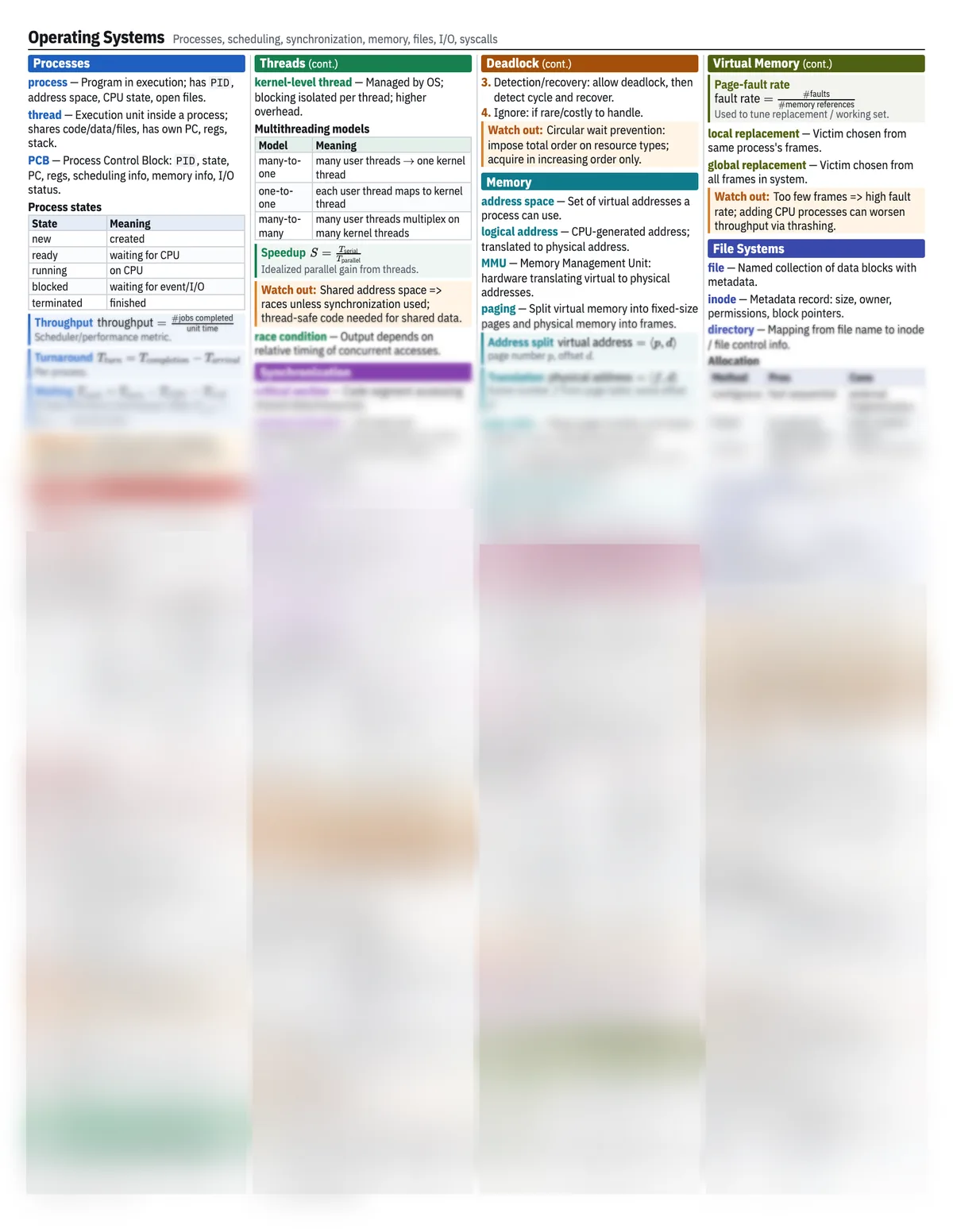 Cheat sheet locked
On the sheet
What’s on it
The topics a typical Operating Systems exam tests, all on the one page.
- Processes and threads
- CPU scheduling algorithms
- Synchronization: locks, semaphores
- Deadlock conditions and avoidance
- Memory management and paging
- Virtual memory and page replacement
- File systems
- I/O and disks
- System calls
Free preview
The free part, as text
The free part of the sheet, section by section. Unlock the full sheet to read the rest, edit any block, and print it or save it as a PDF.
01Processes
- process
- Program in execution; has
PID, address space, CPU state, open files. - thread
- Execution unit inside a process; shares code/data/files, has own PC, regs, stack.
- PCB
- Process Control Block:
PID, state, PC, regs, scheduling info, memory info, I/O status.
Process states
| State | Meaning |
|---|---|
| new | created |
| ready | waiting for CPU |
| running | on CPU |
| blocked | waiting for event/I/O |
| terminated | finished |
Throughput
Scheduler/performance metric.
Turnaround
Per process.
Waiting
If total CPU burst time known; often .
Watch out:Context switch overhead: scheduler choice affects real CPU time; ignore only if problem states so.
02Scheduling
- preemptive
- CPU can be taken away before burst ends.
03Threads
- kernel-level thread
- Managed by OS; blocking isolated per thread; higher overhead.
Multithreading models
| Model | Meaning |
|---|---|
| many-to-one | many user threads one kernel thread |
| one-to-one | each user thread maps to kernel thread |
| many-to-many | many user threads multiplex on many kernel threads |
Speedup
Idealized parallel gain from threads.
Watch out:Shared address space => races unless synchronization used; thread-safe code needed for shared data.
- race condition
- Output depends on relative timing of concurrent accesses.
04Synchronization
- critical section
- Code segment accessing shared data/resources.
- mutual exclusion
- At most one thread/process in critical section at a time.
- lock
- Binary synchronization object;
acquire/release.
Semaphore
Integer synchronization variable.
05Deadlock
- Prevention: break one of 4 conditions (e.g. request all at once to kill hold-and-wait).
- Avoidance: only grant requests that keep state safe (Banker).
- Detection/recovery: allow deadlock, then detect cycle and recover.
- Ignore: if rare/costly to handle.
Watch out:Circular wait prevention: impose total order on resource types; acquire in increasing order only.
06Memory
- address space
- Set of virtual addresses a process can use.
- logical address
- CPU-generated address; translated to physical address.
- MMU
- Memory Management Unit: hardware translating virtual to physical addresses.
- paging
- Split virtual memory into fixed-size pages and physical memory into frames.
Address split
page number , offset .
Translation
frame number from page table; same offset .
- page table
- Maps page number to frame number plus valid/protection bits.
- TLB
- Translation Lookaside Buffer: cache of recent page-table entries.
Effective access time
If TLB hit ratio and memory access time .
07Virtual Memory
Page-fault rate
Used to tune replacement / working set.
- local replacement
- Victim chosen from same process's frames.
- global replacement
- Victim chosen from all frames in system.
Watch out:Too few frames => high fault rate; adding CPU processes can worsen throughput via thrashing.
08File Systems
- file
- Named collection of data blocks with metadata.
- inode
- Metadata record: size, owner, permissions, block pointers.
- directory
- Mapping from file name to inode / file control info.
Allocation
| Method | Pros | Cons |
|---|---|---|
| contiguous | fast sequential | external fragmentation |
| linked | no external fragmentation | slow random access |
| indexed | good random access | index overhead |
- free-space bitmap
- 1 bit per block; bit value indicates free/used.
File links
hard link same inode symbolic link pathname reference
Hard links usually not across file systems.
Cheat sheet locked
Also on the full Operating Systems sheet
8 more sections, with every definition, formula and worked example. Unlimited unlocks every full sheet in the library to edit, print or save as a PDF, and makes unlimited sheets from your own notes.
Scheduling
- nonpreemptive
- Common schedulers
- RR response
- aging
Threads
- user-level thread
Synchronization
- wait signal
- binary semaphore
- counting semaphore
- Classic problems
Deadlock
- deadlock
- 4 necessary conditions
- safe state
- Banker safety
Paging
- page fault
- dirty bit
- valid bit
- Replacement
- Belady
Virtual Memory
- demand paging
- working set
- thrashing
File Systems
- buffer cache
I/O and Syscalls
- blocking I/O
- nonblocking I/O
- DMA
- interrupt
- Disk scheduling
- Disk seek
- system call
- Common syscalls
FAQ
Questions
About the Operating Systems sheet and making your own.
- What does this Operating Systems cheat sheet cover?
- It has 10 sections: Processes, Scheduling, Threads, Synchronization, Deadlock, Memory, Paging, Virtual Memory, File Systems and I/O and Syscalls. Together they cover the topics a typical Operating Systems exam tests, including processes and threads, CPU scheduling algorithms, synchronization: locks, semaphores and deadlock conditions and avoidance.
- Is the operating systems cheat sheet free?
- The first part is free to read on this page, with no account needed. The full sheet opens in the app with Unlimited ($4.99 a month or $19 for a semester), where you can edit it, print it or save it as a PDF. It is one US Letter page and prints cleanly in black and white or colour.
- Can I bring this Operating Systems cheat sheet to my exam?
- Only if your course allows a note sheet, so check the syllabus. This one is a single US Letter page. If your exam allows a different size, such as a 3x5 or 4x6 index card or one page front and back, Cheat Sheet AI makes one at exactly that size from your own lecture notes.
- How accurate is it?
- The sheet was written by our engine from a standard course outline, then a second model fact-checked every formula and statement against it; it corrected 5 statements before publishing. Notation and emphasis vary between courses, so check it against your own lecture notes.
- Can I make a Operating Systems sheet from my own notes?
- Yes. Upload your lecture slides, notes or study guide and Cheat Sheet AI writes a sheet in your course's notation, sized to exactly the space your exam allows. Your first sheets are free.
Your course, your notes, one page.
Upload your own Operating Systems slides or notes and get a study sheet in your course’s notation. Your first sheet needs no account, and a free account adds one more. See pricing