SQL Cheat Sheet — 1-page PDF
SELECT, joins, subqueries, set ops, DML/DDL, indexes, windows, normalization. The whole course on one dense, printable page for your midterm or final, with every formula typeset and worked examples where they help.
The first part is free below. See pricing →
For a specific exam: Databases (SQL) Final exam study sheet.
- 1 pageUS Letter
- 10 sections10 topics
- Free previewfull sheet with Unlimited
 Cheat sheet locked
On the sheet
What’s on it
The topics a typical SQL exam tests, all on the one page.
- SELECT, WHERE, ORDER BY
- Aggregates and GROUP BY, HAVING
- JOIN types
- Subqueries
- Set operations
- INSERT, UPDATE, DELETE
- DDL: CREATE, ALTER, constraints
- Indexes
- Window functions
- Normalization
Free preview
The free part, as text
The free part of the sheet, section by section. Unlock the full sheet to read the rest, edit any block, and print it or save it as a PDF.
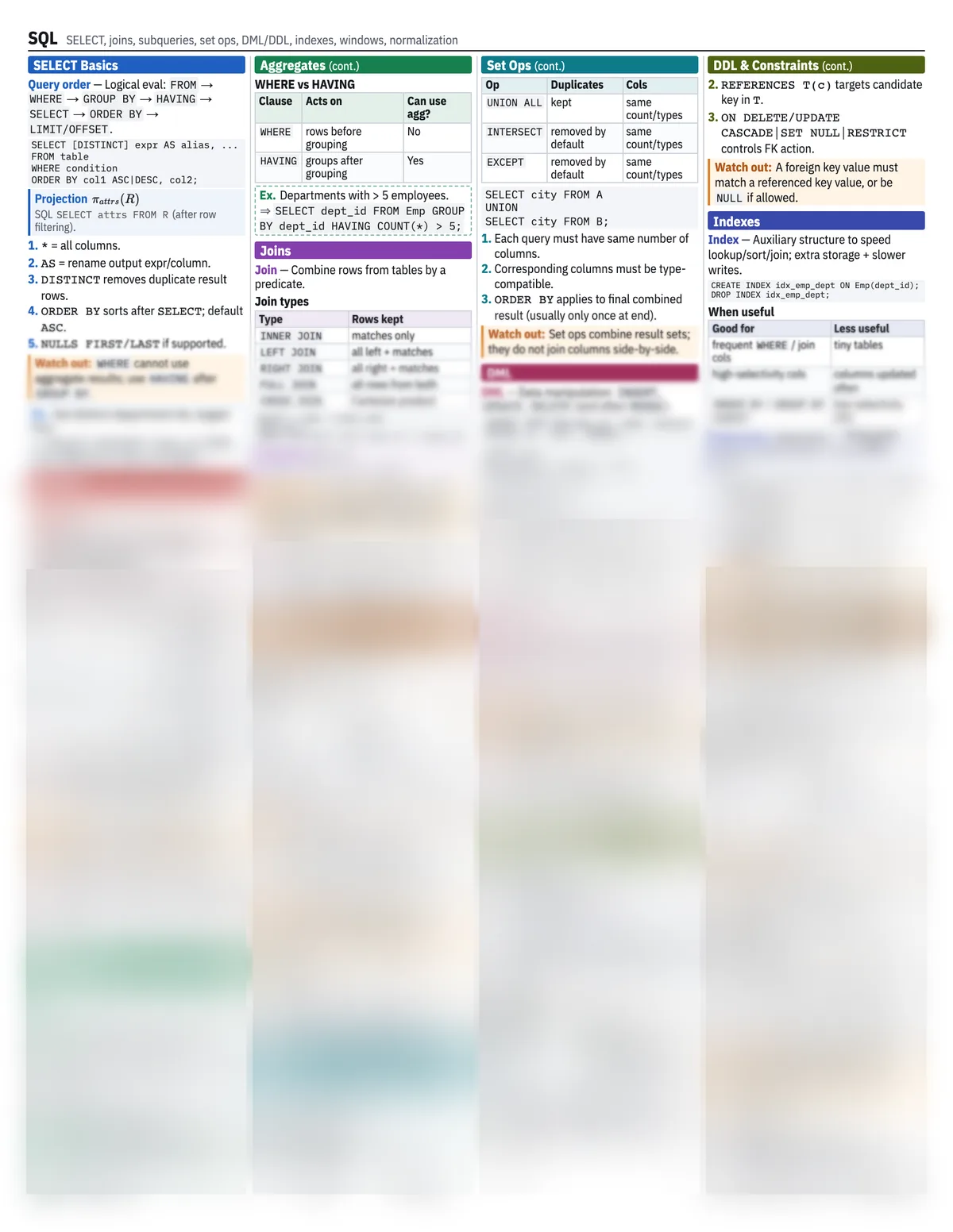
01SELECT Basics
- Query order
- Logical eval:
FROM→WHERE→GROUP BY→HAVING→SELECT→ORDER BY→LIMIT/OFFSET.
SELECT [DISTINCT] expr AS alias, ...
FROM table
WHERE condition
ORDER BY col1 ASC|DESC, col2;
Projection
SQL SELECT attrs FROM R (after row filtering).
*= all columns.AS= rename output expr/column.DISTINCTremoves duplicate result rows.ORDER BYsorts afterSELECT; defaultASC.NULLS FIRST/LASTif supported.
Watch out:WHERE cannot use aggregate results; use HAVING after GROUP BY.
Ex.Get distinct department ids, largest first.
SELECT DISTINCT dept_id FROM Emp ORDER BY dept_id DESC;
02Filtering
Predicates
BETWEEN, IN, LIKE, IS NULL
IS NULL/IS NOT NULL for missing values; LIKE uses % any string, _ one char.
03Aggregates
WHERE vs HAVING
| Clause | Acts on | Can use agg? |
|---|---|---|
WHERE | rows before grouping | No |
HAVING | groups after grouping | Yes |
Ex.Departments with > 5 employees.
SELECT dept_id FROM Emp GROUP BY dept_id HAVING COUNT(*) > 5;
04Joins
- Join
- Combine rows from tables by a predicate.
Join types
| Type | Rows kept |
|---|---|
INNER JOIN | matches only |
LEFT JOIN | all left + matches |
RIGHT JOIN | all right + matches |
FULL JOIN | all rows from both |
CROSS JOIN | Cartesian product |
SELECT e.name, d.dept_name
FROM Emp e
INNER JOIN Dept d ON e.dept_id = d.dept_id;
Cartesian
CROSS JOIN if no join condition.
Watch out:Put join condition in ON for outer joins; moving it to WHERE can remove null-extended rows and change semantics.
05Set Ops
Set operation rules
| Op | Duplicates | Cols |
|---|---|---|
UNION | removed by default | same count/types |
UNION ALL | kept | same count/types |
INTERSECT | removed by default | same count/types |
EXCEPT | removed by default | same count/types |
SELECT city FROM A
UNION
SELECT city FROM B;
- Each query must have same number of columns.
- Corresponding columns must be type-compatible.
ORDER BYapplies to final combined result (usually only once at end).
Watch out:Set ops combine result sets; they do not join columns side-by-side.
06DML
- DML
- Data manipulation:
INSERT,UPDATE,DELETE(and oftenMERGE).
INSERT INTO Emp(emp_id, name, salary)
VALUES (1, 'Ana', 90000);

UPDATE Emp
SET salary = salary * 1.05
WHERE dept_id = 10;

DELETE FROM Emp
WHERE emp_id = 1;
07DDL & Constraints
DEFAULT xsupplies value when omitted.REFERENCES T(c)targets candidate key inT.ON DELETE/UPDATE CASCADE|SET NULL|RESTRICTcontrols FK action.
Watch out:A foreign key value must match a referenced key value, or be NULL if allowed.
08Indexes
- Index
- Auxiliary structure to speed lookup/sort/join; extra storage + slower writes.
CREATE INDEX idx_emp_dept ON Emp(dept_id);
DROP INDEX idx_emp_dept;
When useful
| Good for | Less useful |
|---|---|
frequent WHERE / join cols | tiny tables |
| high-selectivity cols | columns updated often |
ORDER BY / GROUP BY support | low-selectivity cols |
Selectivity
Higher selectivity often => better index payoff.
- Composite index order matters: leftmost prefix usable.
- Covering index can satisfy query from index alone.
- Unique index enforces uniqueness if supported.
Cheat sheet locked
Also on the full SQL sheet
9 more sections, with every definition, formula and worked example. Unlimited unlocks every full sheet in the library to edit, print or save as a PDF, and makes unlimited sheets from your own notes.
Filtering
- Common WHERE forms
Aggregates
- Aggs
- Grouping
- Grouping rule
Joins
Subqueries
- Subquery
- Subquery use
- Exists
Set Ops
- Union family
DML
- Transactions
DDL & Constraints
- DDL
- Constraints
Indexes
Windows & Normalization
- Window function
- Window clauses
- Common windows
- Normalization
- Normal forms
FAQ
Questions
About the SQL sheet and making your own.
- What does this SQL cheat sheet cover?
- It has 10 sections: SELECT Basics, Filtering, Aggregates, Joins, Subqueries, Set Ops, DML, DDL & Constraints, Indexes and Windows & Normalization. Together they cover the topics a typical SQL exam tests, including SELECT, WHERE, ORDER BY, aggregates and GROUP BY, HAVING, JOIN types and subqueries.
- Is the SQL cheat sheet free?
- The first part is free to read on this page, with no account needed. The full sheet opens in the app with Unlimited ($4.99 a month or $19 for a semester), where you can edit it, print it or save it as a PDF. It is one US Letter page and prints cleanly in black and white or colour.
- Can I bring this SQL cheat sheet to my exam?
- Only if your course allows a note sheet, so check the syllabus. This one is a single US Letter page. If your exam allows a different size, such as a 3x5 or 4x6 index card or one page front and back, Cheat Sheet AI makes one at exactly that size from your own lecture notes.
- How accurate is it?
- The sheet was written by our engine from a standard course outline, then a second model fact-checked every formula and statement against it; it corrected 2 statements before publishing. Notation and emphasis vary between courses, so check it against your own lecture notes.
- Can I make a SQL sheet from my own notes?
- Yes. Upload your lecture slides, notes or study guide and Cheat Sheet AI writes a sheet in your course's notation, sized to exactly the space your exam allows. Your first sheets are free.
Your course, your notes, one page.
Upload your own SQL slides or notes and get a study sheet in your course’s notation. Your first sheet needs no account, and a free account adds one more. See pricing